
Viewing Postback Logs
Purpose
The "Logs" section allows:
- To view the history of all sent postbacks
- To diagnose sending errors
- To check request and response data
Opening Logs
- In the pixel list, open the actions menu (⋮)
- Select Logs
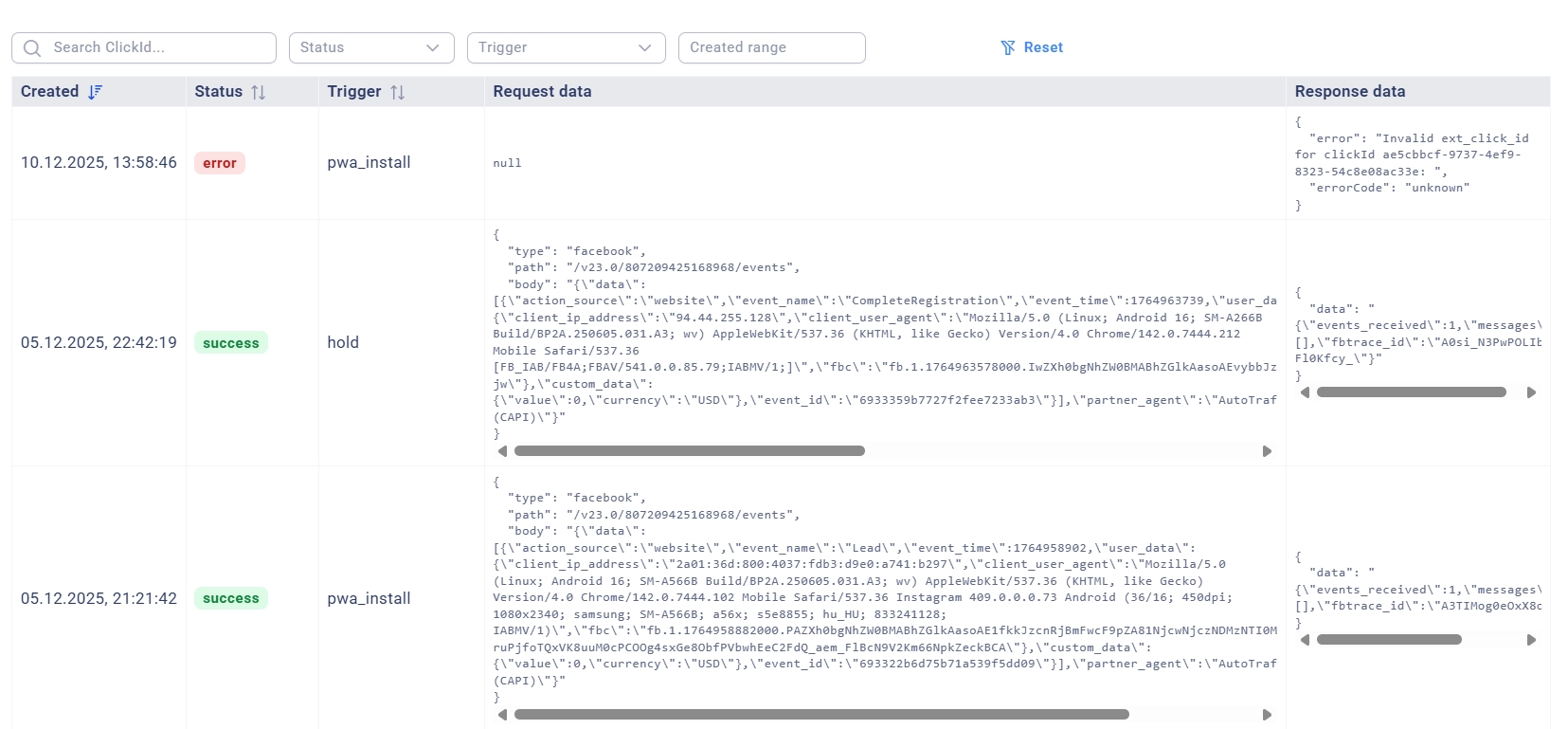
Logs Table
Logs are displayed in a table with the following columns:
Column | Description |
|---|---|
Created | Date and time of postback creation |
Status |
|
Trigger | The tracker event that triggered the postback ( |
Request Data | JSON with the sent request data |
Response Data | JSON with the response from Facebook/HTTP server |
Log Filters
Search by ClickId
Enter the internal Click ID of the tracker to search for postbacks by a specific click.
Example: 507f1f77bcf86cd799439011
Filter by Status
- Success — only successful submissions
- Error — only errors
- Pending — only events in processing
Filter by Trigger
Select the type of event:
- All triggers — all types
- Deposit — only deposits (
accept) - Registration — only registrations (
hold) - Decline Lead — only declined leads (
decline) - Trash Lead — only trash leads (
trash) - PWA Install — only PWA installs (
pwa_install)
Creation Period
Select a date range for filtering logs.
Example: 01.12.24 - 15.12.24
Analyzing Request and Response Data
For Facebook CAPI:
Request Data (request):
{
"type": "facebook",
"path": "/v23.0/1234567890123456/events",
"body": "{\"data\":[{\"event_name\":\"Purchase\",\"event_time\":1705319400,\"action_source\":\"website\",\"event_source_url\":\"https://domain.com/track/campaign_id/ads\",\"user_data\":{\"client_ip_address\":\"203.0.113.10\",\"client_user_agent\":\"Mozilla/5.0...\",\"fbc\":\"fb.1.1705319400000.AbCdEfGh\"},\"custom_data\":{\"currency\":\"USD\",\"value\":100},\"event_id\":\"507f1f77bcf86cd799439011\"}],\"partner_agent\":\"PartnerNetwork/1.0 (CAPI)\"}"
}
Response Data (response):
{"data": "{\"events_received\":1,\"fbtrace_id\":\"A1B2C3D4E5F6G7H8I9J0K1L2M3N4O5P\"}"}
For HTTP Get:
Request Data (request):
{
"type": "http",
"method": "GET",
"url": "https://partner.network/postback?click_id=AbCdEfGh&event=deposit"}
Response Data (response):
{
"status": 200,
"statusText": "OK",
"data": "{\"status\":\"ok\",\"message\":\"Postback received\"}"
}
Common Errors and Solutions
Error | Cause | Solution |
|---|---|---|
| The event is missing ext_click_id | Check the parameter mapping settings in the traffic source |
| Incorrect or expired Access Token | Update the Access Token in the pixel settings |
| Incorrect data format | Check the event data structure in the logs |
| Facebook/HTTP server did not respond in time | Retry the submission |
| Incorrect URL or server is unavailable | Check the postback URL |
| To send a Purchase event to FB CAPI, a payment amount and currency are required | Ensure that the partner sends you the Revenue and Currency parameters, and set a default value in the offer settings if necessary |